
Explore The Best AI Websites & Tool
Your all-in-one toolkit for productivity, creativity, and development. Over 40 powerful tools to streamline your workflow.
SearchHow to Use HD Photo Converter: Elevate Your images
Introduction to HD Photo Converter
In today's visually-driven digital landscape, the quality of images can make or break your online presence. Whether you're an e-commerce entrepreneur, a social media influencer, or simply someone who wants to preserve cherished memories, having high-quality images is crucial. This is where HD Photo Converter comes into play, offering a powerful solution to transform your low-quality images into stunning, high-resolution visuals.
What is HD Photo Converter?
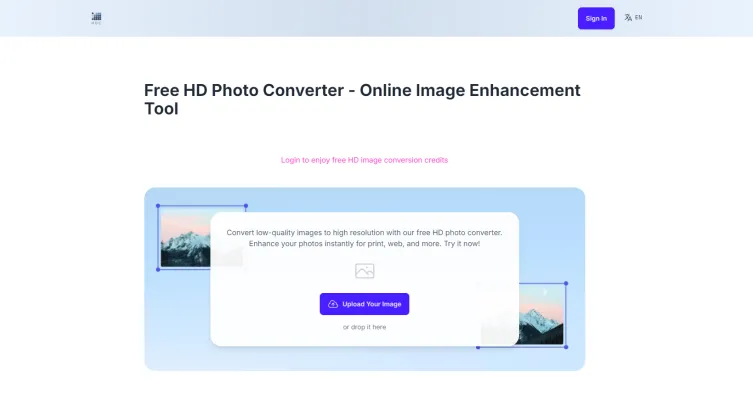
HD Photo Converter is a cutting-edge online tool designed to enhance and convert low-quality images into high-resolution formats. Leveraging advanced artificial intelligence, it provides users with an effortless way to improve image quality for various applications, including personal photos, e-commerce, and marketing materials.
With its user-friendly interface, HD Photo Converter allows individuals—regardless of their technical expertise—to upload images in multiple formats such as JPEG, PNG, BMP, and TIFF, and transform them into stunning high-resolution visuals. The tool is particularly beneficial for those looking to revive old, blurry photos, making them clearer and more vibrant, or enhancing product images to boost online sales.
Additionally, HD Photo Converter prioritizes user privacy and data security, automatically deleting uploaded images after a short period. This feature ensures that users can safely convert and enhance their images without concerns over data retention. Overall, HD Photo Converter is an essential resource for anyone seeking to elevate their visual content effortlessly.
Use Cases of HD Photo Converter
HD Photo Converter have become an indispensable tool in our increasingly visual digital world. Here are some key use cases where these powerful tools shine:
- E-commerce Product Photography: Online retailers can significantly boost their conversion rates by using HD Photo Converters to enhance product images. Crisp, high-resolution photos allow customers to see intricate details, increasing confidence in their purchasing decisions.
- Social Media Marketing: Marketers can elevate their social media presence by converting low-quality images into eye-catching, high-definition visuals. This results in increased engagement and a more professional brand image across platforms.
- Restoring Old Photographs: HD Photo Converters breathe new life into cherished memories by enhancing old, blurry, or faded photos. This preservation of personal and historical imagery is invaluable for both individuals and archivists.
- Print Media Preparation: Graphic designers and publishers use these tools to prepare images for high-quality print materials like brochures, posters, and magazines. The enhanced resolution ensures that printed images remain sharp and clear, even at large sizes.
- Web Design: Web developers leverage HD Photo Converters to optimize images for responsive web design, ensuring that visuals look stunning across various devices and screen resolutions.
By harnessing the power of HD Photo Converters, professionals and enthusiasts alike can significantly improve the quality and impact of their visual content across multiple applications.
How to Access HD Photo Converter
Accessing the HD Photo Converter is a straightforward process that allows you to enhance your images effortlessly. Follow these simple steps:
- Visit the Website: Go to the HD Photo Converter website by entering the URL https://hdphotoconverter.net in your web browser. This will take you to the home page where you can find the image conversion tool.
- Upload Your image: On the main page, look for the option to upload your image. Click on the "Upload your image" button, or simply drag and drop your image into the designated area. Ensure that your image file meets the size requirements (up to 100MB).
- Initiate the Conversion: Once your image is uploaded, click on the "Convert" button to begin the enhancement process. The AI-powered technology will analyze and upscale your image to high definition.
- Download Your Enhanced image: After the conversion is complete, a download link will appear. Click on the "Download" button to save your newly enhanced image to your device. You can now use it for personal or professional purposes.
How to Use HD Photo Converter
Using the HD Photo Converter is a user-friendly process designed to help you enhance your images and convert them into high-resolution formats. Here's a step-by-step guide:
- Access the HD Photo Converter: Visit the HD Photo Converter website at hdphotoconverter.net. You'll be greeted by a user-friendly interface designed for easy navigation.
- Upload Your image: Click on the "Upload your image" button or drag and drop your image file into the designated area. You can upload photos up to 100MB in size, ensuring high-quality images can be processed.
- Choose Enhancement Options: Once your image is uploaded, select the desired enhancement options. The AI-powered technology will automatically optimize your image for clarity and resolution.
- Start the Conversion: Click the "Convert" button to initiate the enhancement process. The advanced AI will work quickly, usually delivering results in seconds, thanks to its lightning-fast processing capabilities.
- Download Your Enhanced image: After the conversion is complete, simply click the "Download" button to save your newly enhanced image to your device. If you converted multiple images, you can download them as a ZIP archive for convenience.
How to Create an Account on HD Photo Converter
Creating an account on HD Photo Converter allows you to access additional features and benefits. Follow these steps to set up your account:
- Visit the HD Photo Converter Website: Go to hdphotoconverter.net.
- Locate the Sign-Up Button: Look for the "Login" or "Sign Up" button, typically found at the top right corner of the page. Click on it to proceed to the registration page.
- Fill Out the Registration Form: Enter the required information, such as your email address and a secure password. Ensure you create a strong password for account security.
- Verify Your Email: Check your email inbox for a verification email from HD Photo Converter. Click the link provided in the email to verify your account.
- Log In to Your Account: Return to the HD Photo Converter website and log in using your newly registered email and password.
Tips for Using HD Photo Converter Efficiently
- Choose the Right Format: Consider your intended use when converting images. JPEG or WEBP formats are optimal for web uploads, while PNG is ideal for images requiring transparency.
- Utilize Advanced Settings: Take advantage of advanced settings to adjust image quality and resize images before conversion. This ensures your images are optimized for their specific applications.
- Batch Processing: Use the batch processing feature to convert multiple images at once, saving time and streamlining your workflow.
- Regularly Check Quality: Always preview your converted images to ensure they meet your quality standards, especially for professional use.
- Explore Premium Options: Consider the premium package for frequent use, offering enhanced features and unlimited access to HD conversions without watermarks.
By following these tips and utilizing the full potential of HD Photo Converter, you can significantly enhance your visual content, making your images stand out in the digital world. Whether you're a professional photographer, a digital marketer, or simply someone who appreciates high-quality visuals, HD Photo Converter is an invaluable tool in your digital arsenal.
Trending


How to Use SoundHound AI: A Comprehensive Guide
Discover how to leverage SoundHound AI for voice-enabled solutions. Learn about use cases, account creation, and tips for efficient implementation.
Packback Review: Revolutionizing Education with AI
Discover how Packback's Instructional AI is transforming education. Explore our comprehensive guide for insights on features, benefits, and alternatives.

How to Use Clickworker: A Comprehensive Guide for Beginners
Learn how to use Clickworker effectively, from creating an account to maximizing your earnings. Explore our practical guide for success in online microtasks.
DeePoster Review 2024: AI-Powered Poster Design Tool Guide
Discover how DeePoster's AI technology revolutionizes poster design. Learn about features, benefits, and alternatives in this comprehensive guide to automated design.

GravityWrite: Top AI Writer, Content Generator & Assistant Review
Discover GravityWrite's AI-powered content creation features, benefits, and alternatives. Explore our guide for practical tips on boosting your content strategy.