
Explore The Best AI Websites & Tool
Your all-in-one toolkit for productivity, creativity, and development. Over 40 powerful tools to streamline your workflow.
SearchHow to Use Mathos AI: Unlock Your Math Potential
Introduction to Mathos AI
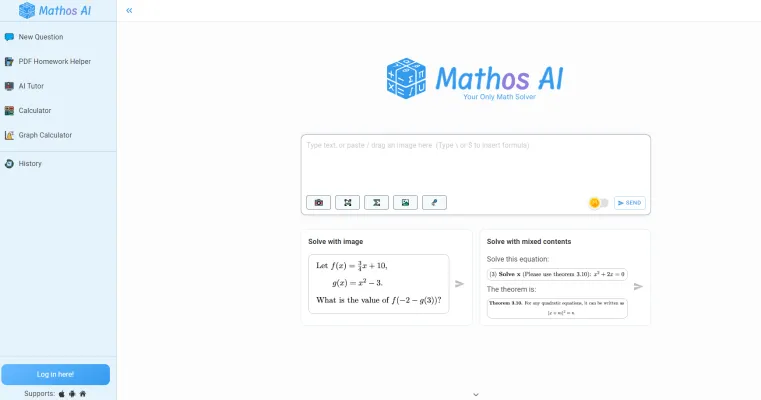
Mathos AI is an advanced AI-powered math solver and personalized tutor designed to assist students of all levels in understanding and solving complex mathematical problems. Trusted by over 2 million users worldwide, Mathos AI offers accurate, instant solutions and detailed step-by-step explanations, making it an invaluable resource for learners tackling everything from basic algebra to advanced calculus.
The platform features a variety of interactive tools, including a dedicated graphing calculator, PDF homework helper, and multiple input methods such as voice, text, and image recognition. This versatility ensures that students can engage with their math problems in a way that suits their learning style.
With its advanced algorithms boasting 20% higher accuracy than traditional tools like ChatGPT, Mathos AI not only provides reliable answers but also enhances the learning experience, allowing users to master concepts more effectively. Whether you're a student, teacher, or lifelong learner, Mathos AI is a comprehensive solution for all your mathematical needs.
Use Cases of Mathos AI
Mathos AI, formerly known as MathGPTPro, is a versatile AI-powered math learning platform with several practical applications:
- Homework Helper: Students can upload photos or PDFs of their math homework, and Mathos AI provides step-by-step solutions. This feature helps learners understand problem-solving processes and tackle assignments more efficiently.
- Personalized Tutoring: The AI adapts to individual learning styles, offering tailored explanations and guidance. It can recognize voice inputs and drawings, making it accessible for various learning preferences.
- Advanced Calculator: Mathos AI combines a dedicated calculator with graphing capabilities, allowing users to solve complex equations and visualize mathematical functions. This is particularly useful for students studying algebra, calculus, and other advanced topics.
- Interactive textbook Companion: Users can "chat" with their PDF textbooks, asking questions and receiving explanations about specific concepts. This feature transforms static learning materials into interactive resources.
- Multi-device Learning: With seamless synchronization across devices, learners can start solving problems on one device and continue on another, ensuring uninterrupted study sessions.
These use cases demonstrate Mathos AI's potential to revolutionize math education by providing accurate, personalized, and accessible learning tools for students at all levels.
How to Access Mathos AI
Accessing Mathos AI is a straightforward process that allows you to tap into powerful math-solving tools and personalized tutoring. Follow these simple steps:
- Visit the Mathos AI Website: Go to Mathos AI's official site. This is the primary platform where you can access all features of Mathos AI, including the math solver, calculator, and AI tutor.
- Create an Account or Log In: If you're a new user, click on the "Sign Up" button to create an account by providing your email and setting a password. If you already have an account, select "Login" and enter your credentials. Having an account helps personalize your learning experience.
- Navigate to the Math Solver: Once logged in, find the math solver tool on the homepage. This feature allows you to input your math problems through typing, voice, or by uploading images.
- Input Your Math Problem: You can type your math question or drag and drop a photo of the problem into the solver area. This flexibility ensures you can easily get help for whatever math challenge you face.
- Click "Solve": Press the "Solve" button. Mathos AI will provide you with an instant answer and a step-by-step explanation, helping you learn and understand the solution process.
By following these steps, you can effectively utilize Mathos AI to improve your math skills and tackle challenging problems with ease.
How to Use Mathos AI
To make the most of Mathos AI's capabilities, follow this step-by-step guide:
- Choose Your Input Method: You can either type your math problem directly into the Mathos AI interface, take a screenshot, or use the voice feature to input your query.
- Upload Your Problem: If you're using a photo or screenshot, drag, paste, or upload it into the designated solver area.
- Press 'Solve': After entering your problem, click the 'Solve' button. Mathos AI will generate an instant answer along with a detailed, step-by-step explanation.
- Utilize the PDF Homework Helper: For homework on PDFs, upload your document and circle the question you need help with.
- Explore Additional Features: Leverage the advanced graphing calculator and dedicated calculators for various math topics, which can help visualize complex equations and enhance your learning experience.
How to Create an Account on Mathos AI
Creating an account on Mathos AI is simple:
- Visit the Mathos AI Website: Go to Mathos AI's official website.
- Click on the Sign-Up Button: Look for the "Sign Up" button, usually found in the top right corner.
- Fill Out the Registration Form: Enter your name, email address, and a strong password.
- Verify Your Email: Check your email for a verification link from Mathos AI and click on it to activate your account.
- Log In to Your Account: Return to the Mathos AI website and click on the "Log In" button. Enter your credentials to access your account.
- Explore and Customize Your Experience: Take some time to explore the features of Mathos AI and customize your profile settings.
Tips for Using Mathos AI Effectively
To maximize your experience with Mathos AI, consider these helpful tips:
- Utilize Multiple Input Methods: Take advantage of the diverse ways to input your math problems—type, draw, or use voice commands.
- Upload PDFs for Homework Help: If you have homework in PDF format, upload it directly to Mathos AI for step-by-step solutions.
- Interact with Solutions: Dive into the step-by-step explanations provided by Mathos AI to enhance your understanding.
- Take Advantage of the Graphing Calculator: Use the advanced graphing features to visualize equations and functions.
- Regular Practice: Consistently using Mathos AI to solve various problems will improve your math skills over time.
By following these tips and guidelines, you can harness the full potential of Mathos AI to enhance your mathematical skills and tackle complex problems with confidence. Whether you're a student struggling with homework, a teacher looking for an innovative teaching tool, or simply someone passionate about mathematics, Mathos AI offers a comprehensive solution to meet your needs.
Trending

Procreate Rejects Generative AI in Digital Art Tools
Popular digital art app Procreate takes a bold stance against incorporating generative AI, sparking debate in the creative community about AI's role in artistic tools and processes.

How to Use Oishi Kenko: AI-Powered Healthy Eating Guide
Discover how to use おいしい健康 for personalized meal planning, recipe searches, and health management. Explore our guide for practical tips on maximizing this AI-powered platform.

Meta Halts Generative AI in Brazil Amid Regulatory Scrutiny
Meta, the parent company of Facebook, has suspended its generative AI tools in Brazil following regulatory pressure from the country's National Data Protection Authority (ANPD). This decision highlights the ongoing global debate over data privacy and AI development.

Whisper AI Review: Revolutionizing Speech Recognition
Explore Whisper AI's features, benefits, and alternatives in our comprehensive review. Learn how this technology is transforming speech recognition across industries.

How to Use Clickworker: A Comprehensive Guide for Beginners
Learn how to use Clickworker effectively, from creating an account to maximizing your earnings. Explore our practical guide for success in online microtasks.